 by
by To change your normal photo to a passport size photo, a website named “cutout.pro” will help you. The some of the main features of this website are Passport Photo Maker, Image Background Removal, Remove background from images and videos automatically, Photo Enhancer & Upscale and Upload Image to Colorize Black and White Photos Online etc. Please follow the given below steps to change your normal photo to a perfect passport size photo.
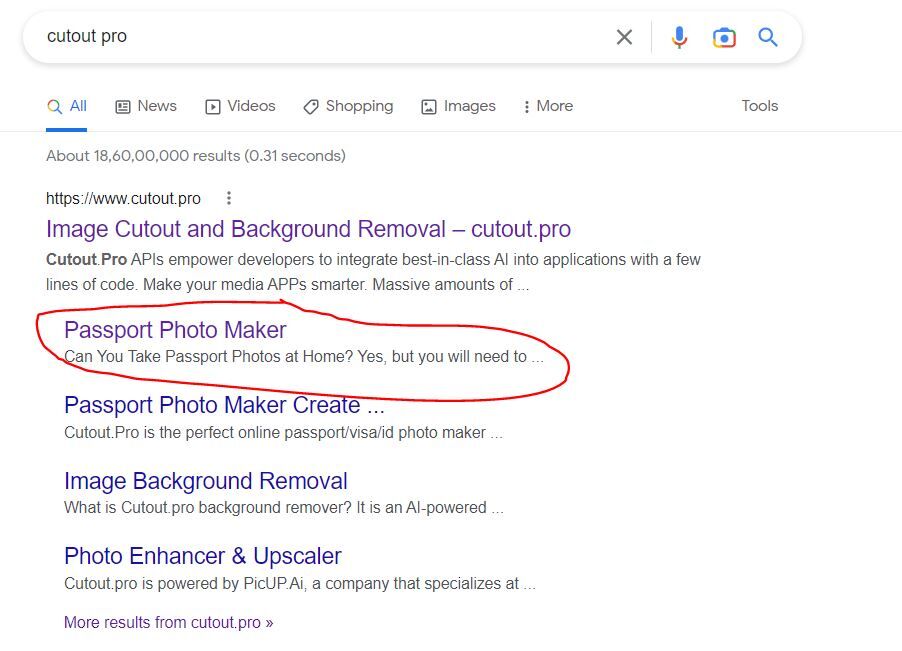
Step 1 : Search as “cutout pro” in google.
Step 2 :Select the option “Passport Photo Maker”
Step 3 : Click on the option ” upload image “. (either image photo from gallery or you can choose camera option and take a photo).

Step 4 : After the image uploaded the background will automatically remove. then click “continue”.
Step 5 : Now crop and choose the size of image to wanted size. You can customize size.
Step 6 : select the background color by click above the paint icon
Step 7 : Choose the costume from options by choosing the t-shirt icon.
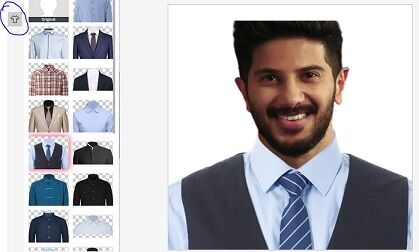
Step 7 : Now download the image.
Click here to make passport size photo